
The Billing page is the place to review your MENO plan, subscription timing, billing records, and outlet add-ons. Billing is available only to the workspace Owner. It is hidden or restricted for Admins and all lower roles.
Open the Billing page
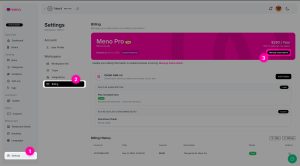
In Settings, select Billing. The page includes:
- A current plan banner
- Your billing cycle and renewal date
- Manage Subscription
- Cancel Renewal
- An Outlet Add-on section
- Billing History
Use the plan banner, billing cycle, and renewal date to check the current state and timing of your subscription before making a change.
Manage payment and subscription details
Select Manage Subscription to open the Stripe Customer Portal. This is where subscription and billing details are managed through Stripe.
The options available in the portal depend on the current Stripe configuration. They can include managing payment methods, billing information, shipping information, subscription changes or upgrades, cancellation, and billing or invoice history. Review the available options in the portal before confirming any change.
If you need to update a payment method or billing information, use the relevant option in the Stripe Customer Portal rather than trying to change it from the MENO Billing page.
Review billing history
The Billing History section lists issued invoices and transactions. For each available entry, you can review its date, amount, description, and status. An invoice download action is available where provided.
Use Billing History to find a past invoice or to check the status information shown for a billing record.
Manage outlet capacity
The Billing page also includes the Outlet Add-on section. Your base MENO Pro subscription includes one outlet seat. Each additional outlet seat is an add-on, and add-ons use the same billing cycle as the base subscription.
You can have more purchased seats than active outlets. If you need more active outlets than your current capacity allows, add the required outlet seats. Changes during a paid billing period are prorated for the remaining time in that period, and the prorated amount is charged then. The next renewal invoice includes the normal recurring amount for the base plan and add-ons.
During a trial, you can add outlet seats after adding a payment method. There is no immediate outlet-seat charge during the trial; when the trial ends, the invoice includes the base plan and active purchased outlet add-ons.
The included base seat cannot be removed. An add-on seat can be scheduled for removal only when you have more seats than active outlets. No refund is issued for the remaining current billing period; the seat remains usable until that period ends and is removed at the next billing cycle.
Cancel renewal
Use Cancel Renewal on the Billing page when you want to stop future renewal. MENO first displays a cancellation-reason form, then sets the subscription to cancel at the end of the current period. Your subscription remains active until the end of the period already paid for.